

Manage Every Customer Conversation in One Shared Inbox
One WhatsApp inbox for your entire team. Manage customer conversations, collaborate seamlessly, and connect directly to Meta—without additional Meerkat per-message markup.

Meet Meerkat
One Shared Inbox for Your Whole Team.

Too Many WhatsApp Chats?Keep Your Team Organized.
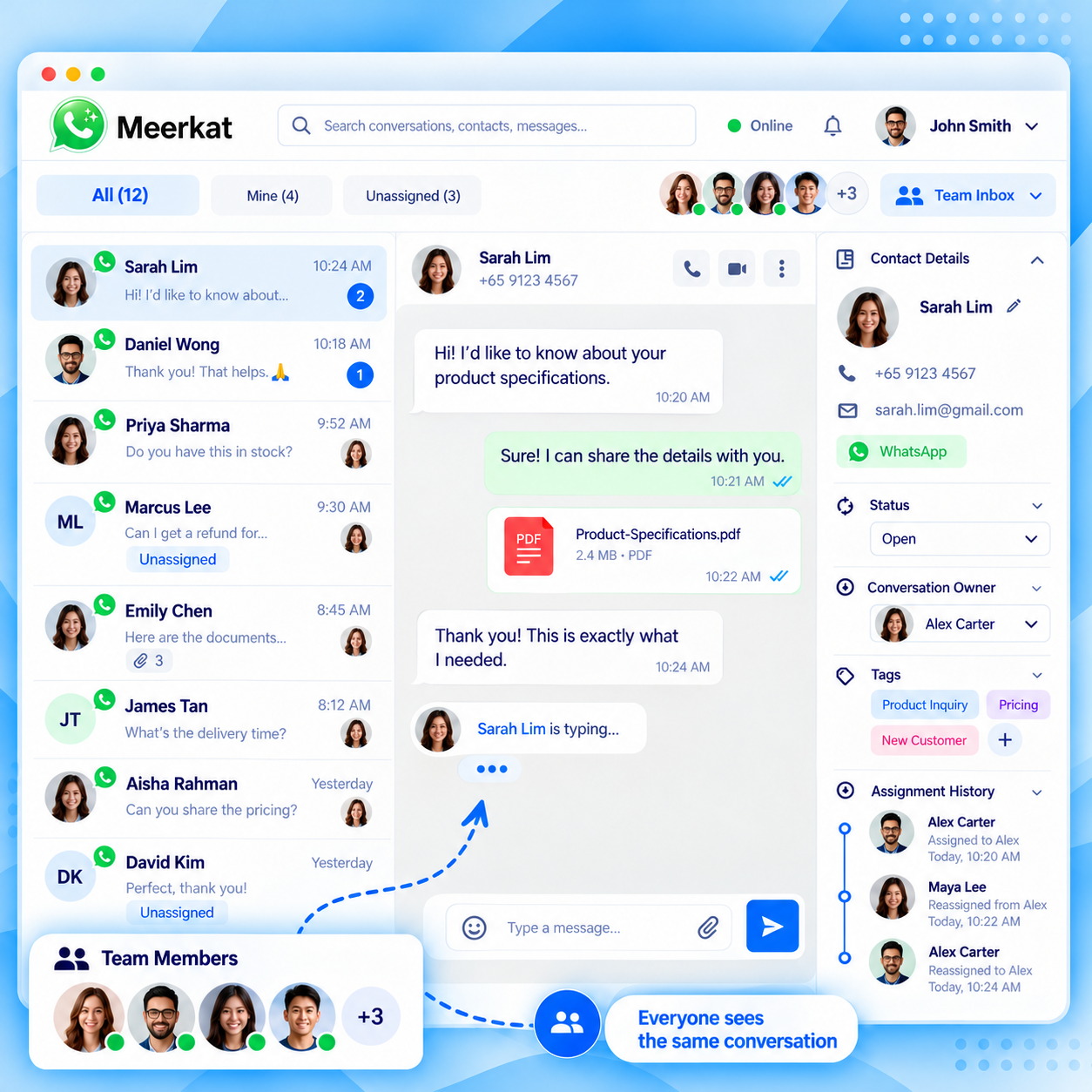
When multiple team members handle customer messages separately, important enquiries can be missed, customers may receive duplicate replies, and conversation history becomes difficult to track. With Meerkat, your team can manage incoming conversations from one shared inbox.
- 01 Messages split across devices and sessions
- 02 Enquiries nobody knows they own
- 03 Two people answering the same customer
- 04 Context lost when a conversation moves
- 05 Separate dashboards and extra software charges
WITHOUT MEERKAT — SCATTERED CONVERSATIONS
5 tools · 1 numberWITH MEERKAT — ONE SHARED INBOX
1 inbox · whole teamWhy choose Meerkat
Your WhatsApp Inbox. Without Extra Per-Message Charges.
Meerkat connects directly to your Meta WhatsApp Cloud API, so you get the shared inbox you need without another per-message charges.
Typical hosted inbox provider
You rent the inbox, pay for seats, and the provider sits between you and Meta — taking a slice of every message.
Meerkat
Self-hosted in your WordPress environment, with greater control over customer data and direct Meta billing. Shopify support is coming soon.
Meta WhatsApp messaging fees still apply and are charged separately by Meta under your own Cloud API account. Meerkat does not bill you per message, and no specific competitor pricing or savings are claimed here.
Why choose Meerkat
Everything Your Team Needs to Manage WhatsApp Together.
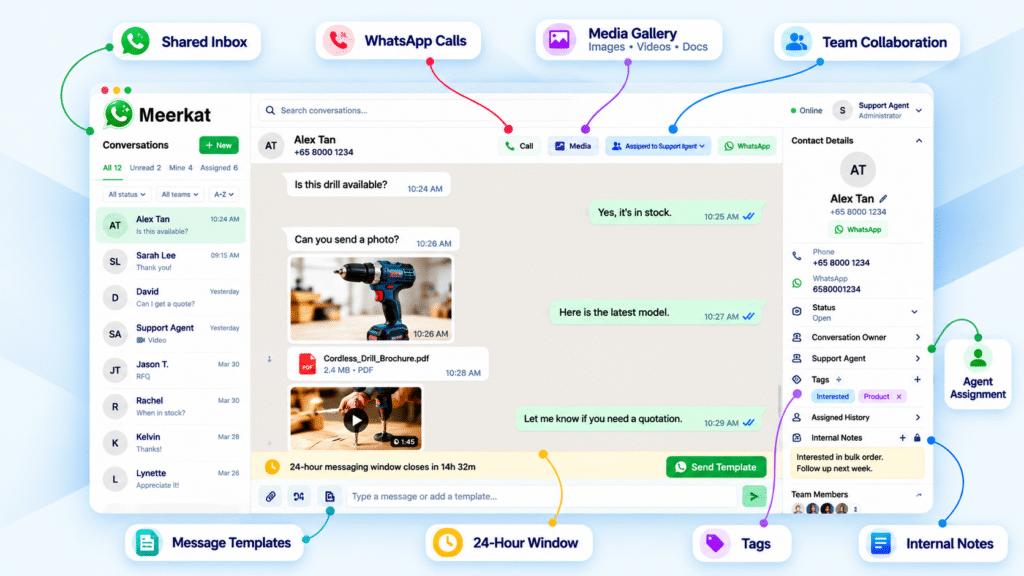
A complete WhatsApp team inbox built for businesses that want speed, clarity, and control over every customer conversation.
Shared Team Inbox
Every customer conversation in one place. Your whole team reads from the same inbox, so nobody is working from a different screen, a personal phone, or an older copy of the thread.
- ✓One inbox for the whole team
- ✓Shared conversation history
- ✓Filter by all, mine or unassigned

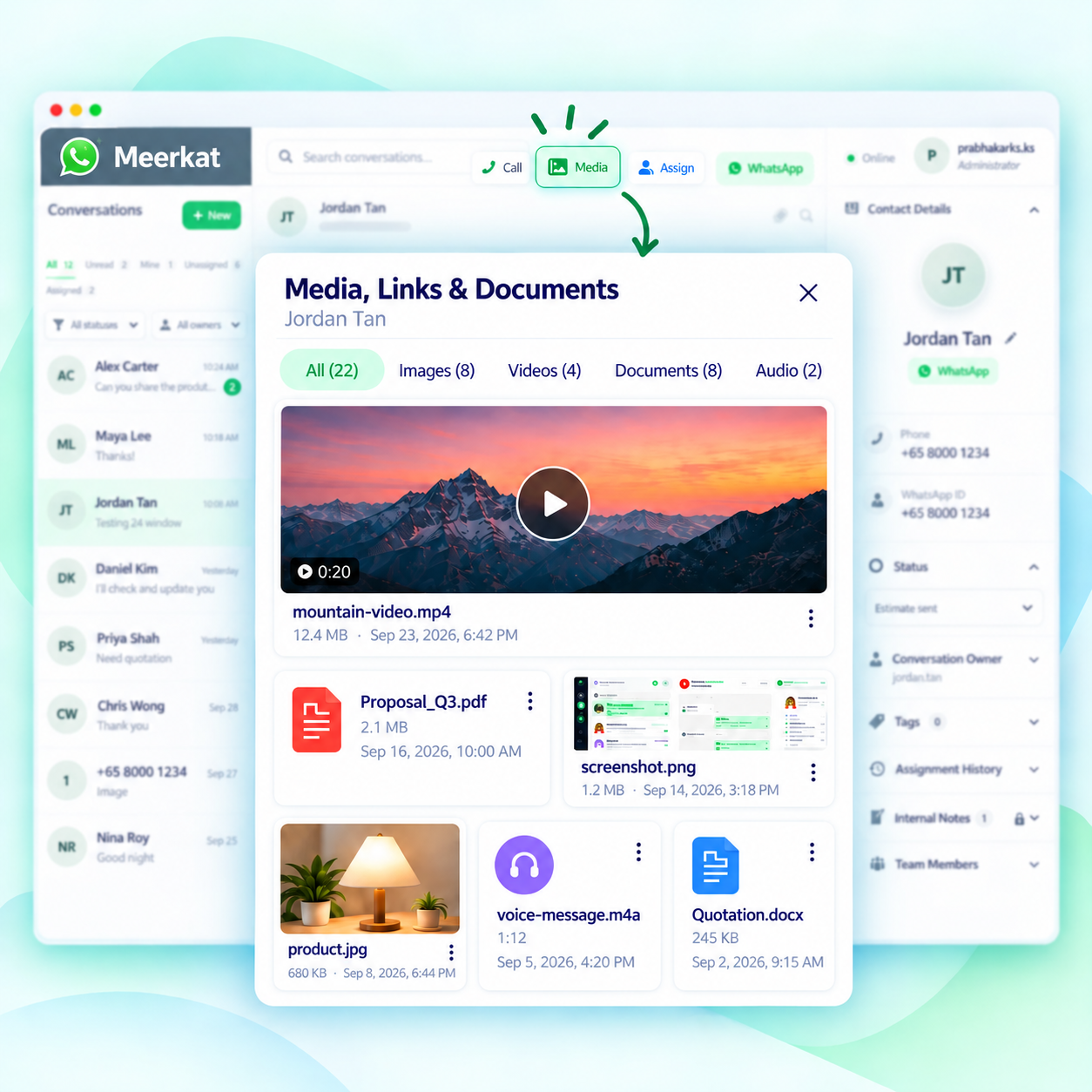
Find Old Media in Seconds
Stop scrolling through old conversations to find customer-shared files. Access documents, images, videos, and audio from dedicated media folders.
- ✓Separate folders for documents, images, videos, and audio
- ✓Easily find files from previous conversations
- ✓Quickly access customer-shared media

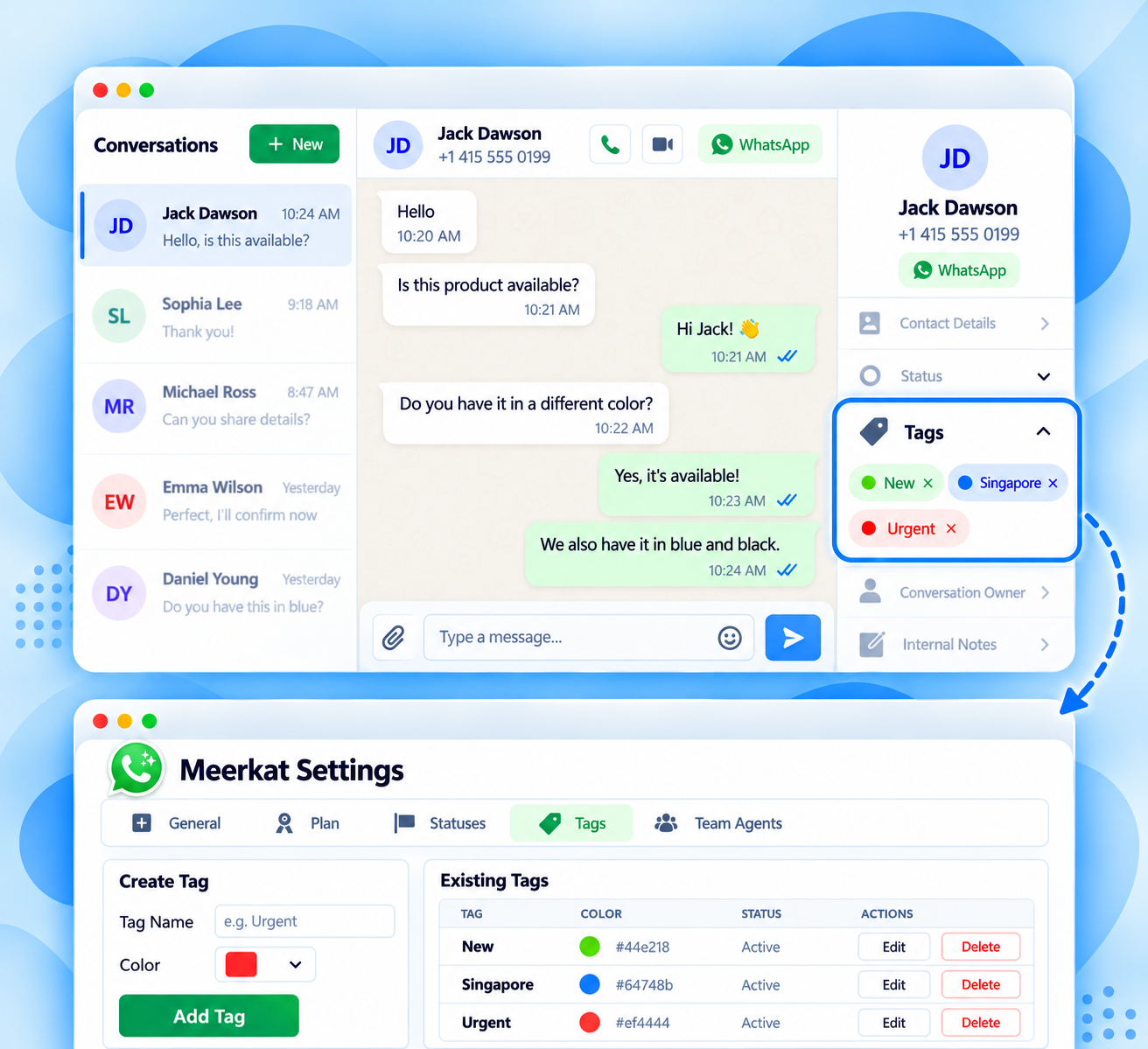
Tag Conversations & Customers
Organize conversations with tags so your team can identify important customers, categorize enquiries, and find conversations that need further action.
- ✓Add tags to conversations and customers
- ✓Categorize enquiries by type or priority
- ✓Find tagged conversations for follow-up
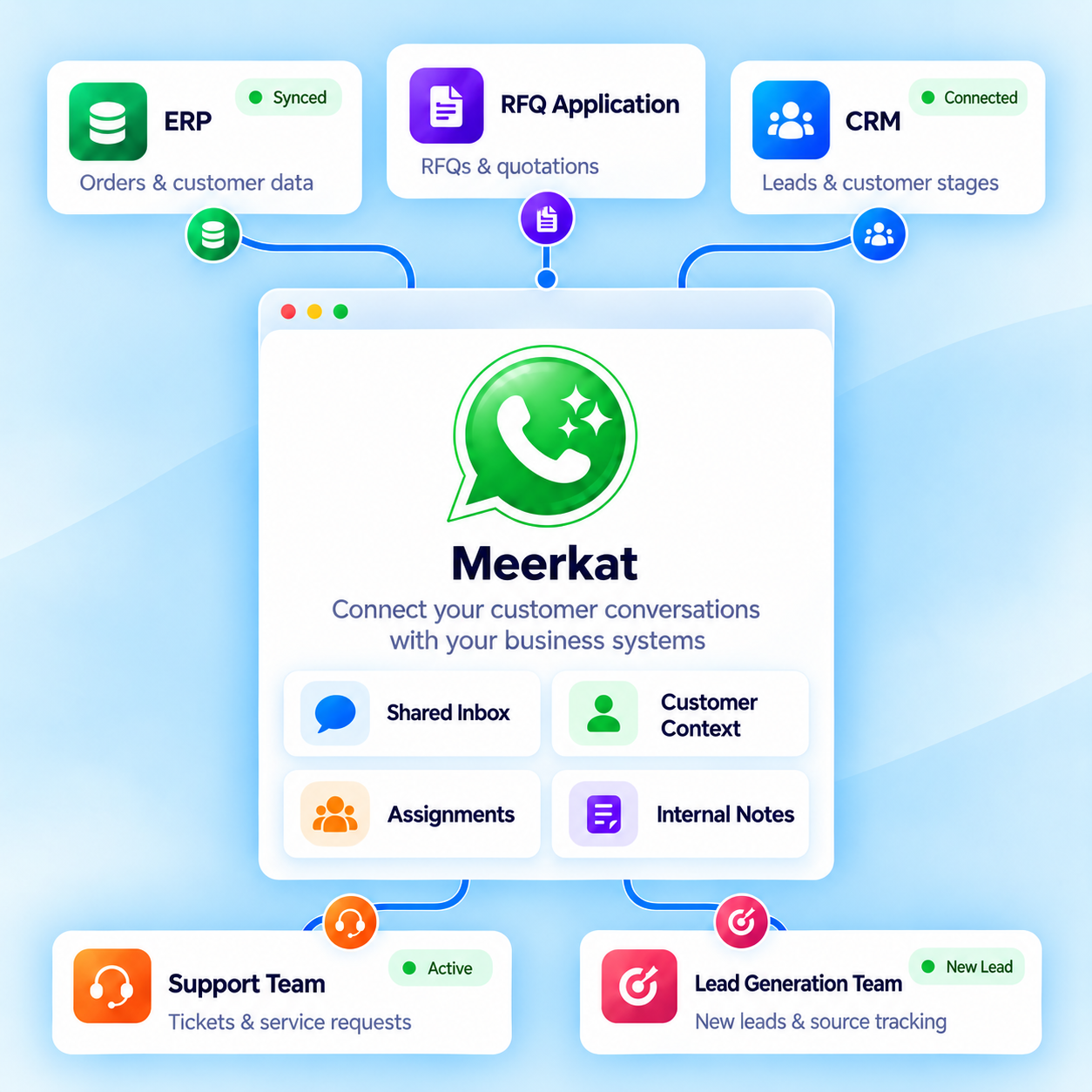
Connect with Your Business Applications
Connect Meerkat with your ERP, CRM, or other external applications to help your team coordinate customer and vendor communication alongside business processes.
- ✓ERP and external application integrations
- ✓Connect customer and vendor workflows
- ✓Support business process automation

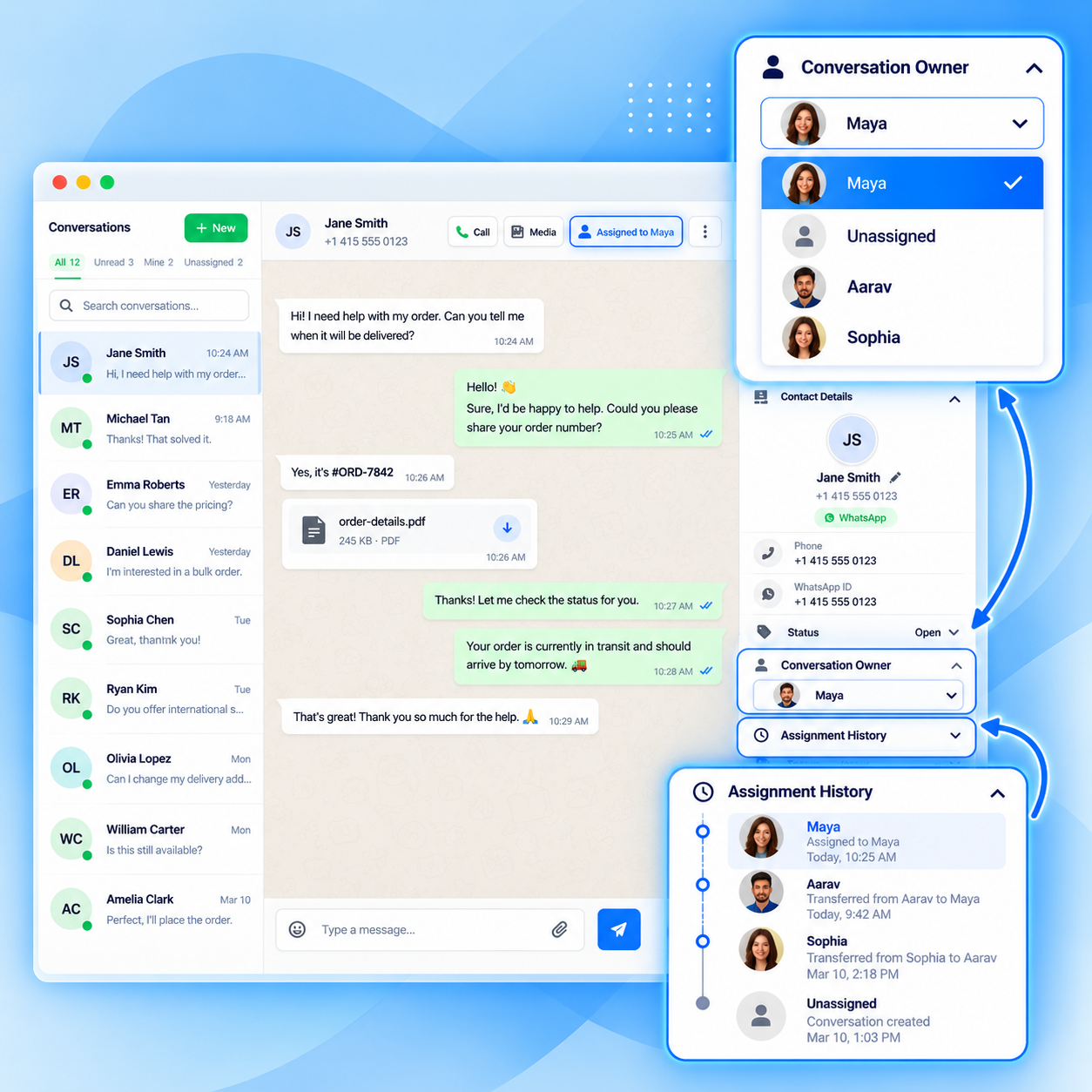
Shared Inbox & Seamless Agent Handover
Let your team manage customer conversations together and transfer chats between agents without losing the conversation history.
- ✓Shared access to customer conversations
- ✓Assign and transfer chats between agents
- ✓Preserve conversation history during handovers
PLUGIN INTERATIONS
Works Seamlessly With Your Platform
Connect Meerkat with the platforms you use to manage your business. Get started with WordPress today, with Shopify integration coming soon.
WordPress
Self-hosted WordPress Plugin · wp-admin
Install Meerkat on WordPress and manage customer conversations directly from your own website dashboard, connected to your own Meta WhatsApp Cloud API.
Shopify
Shopify app · planned
Meerkat is planned for Shopify merchants who want an integrated way to manage customer conversations alongside their store operations.
One WhatsApp Inbox. For Different Business Teams
Whether you handle new enquiries, customer support, sales, or service requests, Meerkat helps your team keep WhatsApp conversations organized.
Sales Teams
Qualify leads faster, track deal stages, and never lose a prospect mid-conversation.
Support Teams
Resolve tickets with full context, escalate smoothly, and keep customers happy.
E-commerce
Handle order inquiries, returns, and pre-purchase questions in one place.
B2B Services
Manage client onboarding, proposals, and account updates collaboratively.
RFQ Handling
Collect, route, and respond to requests for quotation with structured workflows.
Service Providers
Coordinate appointments, updates, and follow-ups across your field team.
From Customer Message to Team Reply See How Meerkat Works
When a customer contacts your business on WhatsApp, Meerkat brings the conversation into your shared WordPress inbox, where your team can manage and reply.

Service Providers
Your customer contacts your business using your WhatsApp number.

Inbox Appears
The new conversation appears in the Meerkat shared inbox.

Agent Opens Chat
A team member takes responsibility for the customer enquiry.

Responds Quickly
Respond using messages, images, documents, or approved WhatsApp templates.

Customer Gets Reply
Your customer receives the response directly in WhatsApp.
See How to Use Meerkat. Watch the Step-by-Step Demo
Learn how to connect your WhatsApp Business account, manage incoming messages, assign conversations, share files, and collaborate with team members directly from WordPress.
Simple, Transparent Pricing
Choose the plan that fits your team’s needs. All plans include our core WhatsApp team inbox features.
For small teams getting started with shared WhatsApp communication.
$0
Free WordPress plugin
Includes
- Shared WhatsApp team inbox.
- Agent conversation assignment.
- Text and media communication.
- Basic approved message templates.
- No Meerkat per-message markup.
Ideal for growing businesses and support teams.
Coming Soon
Annual WordPress license planned
Planned features
- Everything in Free
- More team members.
- Custom quick replies.
- Advanced template capabilities.
- Call history and logs.
For larger teams and businesses managing multiple communication workflows.
Coming Soon
Annual WordPress license planned
Planned features
- Everything in Pro
- Multiple WhatsApp numbers
- Advanced analytics
- Priority support
- AI Support
All prices are in USD. Meta’s WhatsApp conversation fees may apply separately based on your usage.
Frequently asked questions
Everything You Need to Know Before Getting Started
If something here is still unclear, the honest answer is that it matters — ask us before you install.
What is Meerkat ?
Meerkat is a shared WhatsApp team inbox that lets multiple agents collaborate on customer conversations from one unified workspace.
Does Meerkat charge for each WhatsApp message?
No. Meerkat does not add a per-message markup. You connect your own Meta WhatsApp Cloud API, so applicable WhatsApp messaging fees are charged separately by Meta on your own account — Meerkat does not add anything on top.
Can multiple agents manage one WhatsApp number?
Yes — that is the point of Meerkat. Your team works from one shared inbox connected to your WhatsApp Business number. Conversations can be assigned and reassigned between team members, and everyone sees the same conversation history.
Is Meerkat self-hosted?
The current Free version is deployed as a self-hosted WordPress plugin on hosting you control. Your business owns the Meta connection, and Meerkat provides the inbox your team works in.
Are the Pro & Business trial and refund guarantee available?
Not yet. The 14-day no-card Pro trial and the 30-day money-back guarantee on eligible purchases are planned offers, not active ones. They may change before release.